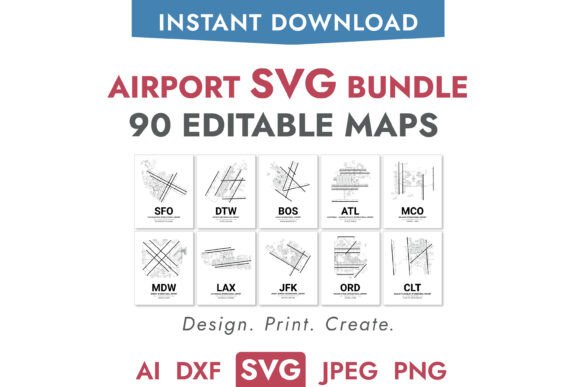
Airport SVG Bundle: 90 Airport Maps for Designers and Makers
Precision Meets Creativity with 90 Airport Vector Layouts
For professionals and hobbyists who work with digital design, laser cutting, or aviation-related projects, having access to accurate and scalable airport maps can make a real difference. The Airport SVG Bundle, 90 Airport Maps offers a comprehensive collection of vector-based airport layouts, designed to support a wide range of creative and technical applications. Whether you're preparing a custom gift, designing a presentation, or crafting a detailed model, this bundle provides the tools you need to bring your ideas to life with accuracy and flexibility.
What You Get and How It Helps Your Projects
This bundle includes 90 of the world's busiest airports—60 from the United States and 30 from international locations—each represented in two versions: full detail and simplified. The full version captures every major airport component, including runways, taxiways, terminals, aprons, and buildings. The simplified version strips away everything but the runways and taxiways, making it ideal for minimalist designs or technical diagrams where clarity is key.
Each airport comes in five formats: SVG, AI, DXF, PNG (transparent), and JPEG. This variety ensures compatibility with a broad set of tools, from Cricut and Silhouette machines to Adobe Illustrator, CAD software, and more. All files are neatly organized into individual folders, allowing for easy access and efficient workflow management.
Real-World Applications for Designers and Enthusiasts
One of the standout benefits of the Airport SVG Bundle, 90 Airport Maps is its adaptability across different creative and technical domains. Here are a few practical ways users can apply these files:
- Crafting and Custom Gifts: Create personalized airport-themed items like wall art, mugs, or travel journals using laser cutters or sublimation printers. The transparent PNG format works especially well for overlays on fabric or glass.
- Graphic Design and Presentations: Use the AI and SVG files to integrate detailed airport visuals into marketing materials, educational content, or aviation-related reports. The layered structure allows for easy customization to match your brand or project needs.
- Modeling and Prototyping: For scale models or engineering prototypes, the DXF and AI files offer precision geometry that can be imported directly into CAD or CNC software for accurate reproduction.
- Educational Tools: Teachers and aviation educators can use the maps to illustrate airport layouts, air traffic patterns, or geography lessons with high-quality visuals that support better understanding.
Why Accuracy and Flexibility Matter
Many design resources rely on approximations or stylized visuals, but the Airport SVG Bundle, 90 Airport Maps uses official airport layouts to ensure that every runway and terminal is accurately represented. This level of detail is especially important for professional applications where precision is critical—like architectural models, flight simulation environments, or infrastructure planning.
The layered design of the full version also allows users to toggle elements on and off, enabling them to create variations for different use cases without needing to redraw or manipulate the files extensively. This saves time and reduces the learning curve, especially for those who may not be familiar with advanced vector editing tools.
Who Benefits Most from This Bundle?
While the Airport SVG Bundle, 90 Airport Maps appeals to a wide audience, it’s especially valuable for:
- Designers who need scalable, editable graphics for print or digital media.
- Makers and Crafters using laser cutters or vinyl cutters to create airport-themed decor or merchandise.
- Aviation Enthusiasts looking for accurate layouts for personal collections or hobby projects.
- Educators developing visual aids for geography, engineering, or aviation courses.
- Engineers and Planners needing precise data for simulations, models, or presentations.
If you frequently work with airport layouts or need to produce accurate, scalable visuals for commercial or personal use, this bundle can significantly streamline your workflow and expand your creative possibilities.
Choosing the Right Format for Your Needs
Understanding which file format to use can make a big difference in how effectively you can apply these maps:
- SVG: Best for use with cutting machines like Cricut or Silhouette, and for web graphics that need to scale without losing quality.
- AI: Ideal for detailed editing in Adobe Illustrator, especially for complex design projects.
- DXF: Recommended for CAD software and CNC machines where geometric accuracy is essential.
- PNG (transparent): Perfect for overlays, web use, and print projects where background transparency is needed.
- JPEG: Useful for previews, mockups, or situations where a standard image file is preferred.
Each format serves a specific purpose, so it’s worth considering your end goal before selecting a file type. For example, if you're creating a model airport for a school project, DXF files may be most useful. If you're designing a T-shirt or mug, the transparent PNG will likely be your go-to choice.
Considerations and Limitations
While the Airport SVG Bundle, 90 Airport Maps offers a wealth of options, it's important to understand its scope and limitations. The bundle focuses on the largest 90 airports globally, which means smaller or regional airports aren't included. Users with specific regional needs may need to supplement this collection with other resources or request custom conversions.
Additionally, while the files are based on official airport layouts, they are not intended for professional aviation navigation or regulatory use. They are designed for creative, educational, and hobbyist applications where accuracy is important but not mission-critical.
Maximizing Value Through Organization and Reusability
One of the often-overlooked benefits of this bundle is the way the files are structured. Each airport has its own folder containing all five formats, making it easy to locate and work with the files you need. This organization reduces the time spent searching through directories and minimizes confusion, especially when working on multiple projects at once.
Because these are digital files, there's no physical inventory to manage, and you can reuse them across different projects without degradation in quality. This makes the Airport SVG Bundle, 90 Airport Maps not only a cost-effective solution but also an environmentally friendly one.